Family Nest: Private Locator
- 4.4
- Rating
- 1.00M
- Installs
- Free
- Price

 Analysis by App-foxy
Family location apps can be genuinely useful, but they also ask for a level of trust that a weather app or shopping app never needs. That is why I approached Family Nest: Private Locator less like a simple map tool and more like a shared household agreement. Developed by Family Nest | GPS Live Locator, this free parenting app is built around real-time location sharing with consent, check-ins, and SOS help. In my experience, its appeal comes from keeping those choices visible rather than treating constant tracking as something every family should accept automatically.
The app has reached over a million installs and holds a 4.4 average from around 28 thousand ratings, which suggests that the basic idea works for a substantial audience. Still, those numbers do not answer the most important question: will your family feel comfortable using it every day? My answer is cautiously positive. It can be a practical safety layer for families who agree on when location is shared, but it is not a substitute for communication, judgment, or a proper emergency service.
Trust starts with consent, not the map
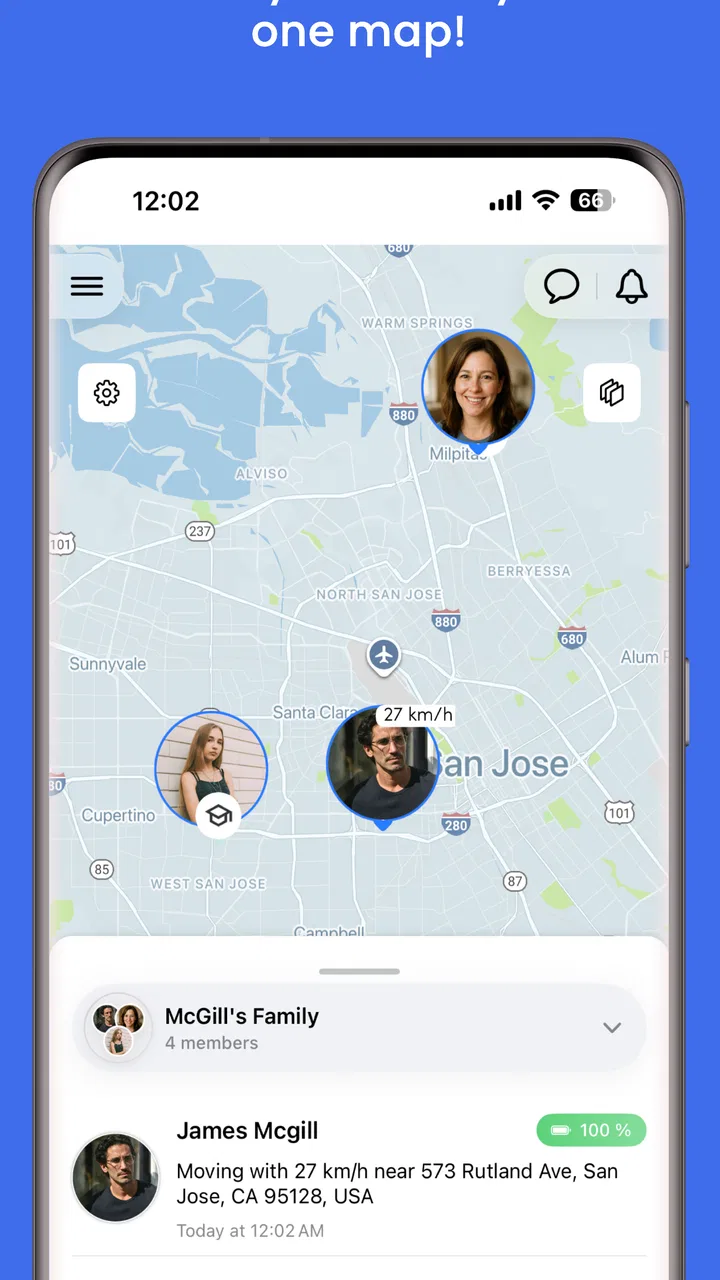
The strongest part of Family Nest is the way its purpose is framed. The app is not simply about watching a dot move around a map. Its central tools are live family location, check-ins, and SOS, and the store summary specifically presents location sharing as consent-based and private by default. That distinction matters. A location service becomes much easier to live with when every person understands what is being shared and why.
You May Also Like

 Blood Strike: 2.5 Anniversary
Blood Strike’s Loadouts Turn Every Drop Into a Tactical Gamble
A close look at Blood Strike’s custom loadouts: how fast access to signature weapons reshapes its battle royale rhythm, rewards preparation, and narrows the gap between fights.

 Pandora - Music & Podcasts
Pandora’s Music Is Easy to Start, but Harder to Recover
Pandora’s strength is its low-effort path from a seed to a station. Its weak spot is how much confidence it asks you to place in connection, setup, and quiet recovery.

 8 Ball Pool
 Is Built on Rivalries, Rematches, and Routine
A close look at the rivalries, rematches, shared routines, and unanswered safety questions that turn a quick pool match into a persistent mobile community.

 Samsung Music
’s Quiet Strength Is Playing What You Already Own
Its reach comes less from spectacle than from dependable access to a personal library. That simplicity is both the app’s strongest retention engine and its ceiling.

 AccuWeather: Weather Radar
AccuWeather Review: A Quick, Clear Forecast for Everyday Decisions
For everyday plans, the best forecast is the one you can understand quickly. AccuWeather makes rain timing, radar, and local conditions easy to act on, with a few trade-offs.

 Hill Climb Racing
Why Hill Climb Racing Still Turns Crashes Into One More Run
A tiny car, a bumpy hill and one more upgrade: Hill Climb Racing keeps resurfacing because its simple chaos makes every near-miss feel personal.
More From Our News Desk



I would introduce it to a family by discussing the rules before installing it. For example, parents might agree that location is useful during a school commute, a late journey, or an outing in an unfamiliar place, while teenagers may reasonably object to the idea of being watched without a clear purpose. The app can support that conversation, but it cannot replace it. If one person feels pressured into joining, the technical controls will not create genuine trust.
This makes the app a better fit for households that want a shared safety tool than for anyone looking for silent surveillance. That is an important boundary. A parent who wants to know whether a child arrived safely can use a check-in workflow. A family member who wants constant, unexplained monitoring may find the consent-first approach less satisfying, and that is arguably a healthy limitation.
The developer name, Family Nest | GPS Live Locator, makes the intended audience clear: this is a family-focused product rather than a general-purpose location utility. Its content rating is Everyone, so it is presented as suitable for a broad audience. Even so, I would still treat setup as a family decision, especially when children or teenagers are involved. An age label does not remove the need to explain location privacy in language each person understands.
What the main tools are good for
Real-time location is most useful when it answers a specific practical question. Is someone still on the way home? Has a family member reached the agreed meeting point? Is a child travelling with the right group after an activity? Used this way, the map reduces unnecessary calls and messages. It gives the family a shared reference point instead of making one person repeatedly ask for updates.
Check-ins are even more valuable in situations where continuous visibility would be excessive. A child can confirm arrival at school, a partner can signal that a journey is complete, or an older relative can let the family know that an appointment went smoothly. This is one of the app’s more useful trade-offs: a quick confirmation can provide reassurance without turning every moment of the day into a tracking event.
The SOS function serves a different purpose. It is for moments when a person needs to draw attention to a problem quickly, not for routine status updates. I would make sure every member knows what the button is intended to communicate before relying on it. A family should also agree on what happens after an alert, because an SOS feature is only useful if someone notices it and knows how to respond.
That last point is easy to overlook. No location app can guarantee that a person is safe merely because their icon appears on a screen. A phone may be unavailable, a signal may be weak, or the person may be unable to interact with the device. I see Family Nest as a communication aid and an extra layer of awareness, not as a replacement for emergency contacts or local emergency services.
A realistic family routine
Imagine a parent collecting two children after different activities. One child finishes at the usual time, while the other has an unpredictable end time. Instead of sending several messages, the family can use a check-in when each child is ready, and the parent can use the shared location view while travelling. If something feels wrong, the SOS option provides a clear escalation path rather than another vague “where are you?” message.
In that scenario, the app is doing three separate jobs: reducing routine communication, showing useful live context, and providing a way to signal urgency. The key is that the family has already agreed on the workflow. Without that agreement, the same tools could produce confusion. One person might expect a check-in after every journey, while another might assume that live location is enough.
I also think it can help during group outings. A family visiting a crowded place can decide that everyone shares location temporarily and checks in at a meeting point. Once the outing ends, they can stop using that arrangement. This temporary approach is more respectful than leaving permanent sharing enabled simply because it was convenient once.
Privacy choices need attention during setup and daily use
“Private by default” is a reassuring starting point, but I would not treat it as a reason to skip the settings and consent screens. Location information is sensitive by nature. Before adding family members, I would check who can see whom, which people actually need access, and whether each participant understands the arrangement. The safest setup is usually the smallest one that solves the real problem.
There is also a practical difference between a person choosing to share their location and a person forgetting that sharing is still active. That is why I would create a routine for reviewing the family group. Remove people who no longer need access, revisit arrangements after a change in custody or living situation, and make sure an old phone is not still connected to an account. These are not glamorous tasks, but they are where privacy habits become real.
Account control deserves the same care. If a phone is lost, shared with another person, or replaced, the owner should know how to secure access and update the household arrangement. I would not install a family locator on a device without a screen lock, because the map and alerts could become visible to anyone who picks it up. The app’s value depends partly on the security habits surrounding it.
Another sensitive moment is the first time a child asks why location is being shared. I would avoid saying “because I need to know where you are” and instead explain the exact situation the tool is meant to help with. “Use it when you travel home alone” is a clearer and more limited rule than “keep it on all the time.” That wording gives the child a meaningful role in the decision.
Consent is an ongoing choice
Consent should not be treated as a one-time button pressed during installation. Family circumstances change. A teenager may become more independent, a relative may stop travelling alone, or a parent may realise that check-ins are enough for a particular routine. I appreciate that the app’s purpose leaves room for these adjustments, because a good family safety tool should support changing levels of participation.
I would also distinguish between consent and convenience. It may be easier for one parent to leave everyone’s location visible permanently, but that does not automatically make it the fairest arrangement. A better question is whether the current sharing level is necessary for the situation. If a check-in solves the problem, constant live visibility may add privacy cost without adding much safety.
This is where Family Nest compares favourably with informal alternatives such as sending a text message, but not in every situation. A message is often better for explaining delays, sharing a change of plan, or discussing something personal. The app is better when a family needs a common location view or a structured status signal. I would use both rather than force every communication into the locator.
It also differs from broad social location services. A general social app may encourage sharing with friends or contacts across many parts of life, while Family Nest is focused on a household safety context. That narrower purpose can make the conversation simpler, provided the family keeps the group limited and does not add people casually.
Where the app may create friction
The biggest weakness is not necessarily a missing button; it is the possibility of false reassurance. A live map can look precise and authoritative, yet families may start relying on it too heavily. If someone’s location has not updated, that does not automatically mean danger, and if the map shows a familiar place, that does not prove everything is fine. I would teach children and adults to treat the display as one clue among several.
Battery, connectivity, and phone availability are everyday realities for any location service. A device left at home, switched off, or unable to connect will reduce the usefulness of live tracking. I would never make a family rule that assumes the app is always online. A simple backup plan—who to call, where to meet, and what to do when nobody responds—is still necessary.
There can also be social friction around alerts. If one person receives every update and another expects immediate action, the app may create arguments instead of reducing them. Before relying on SOS, decide who is responsible for noticing it and what counts as an urgent response. That conversation is a non-obvious but essential part of using the feature responsibly.
The free price makes trying the app accessible, but in-app purchases range from $0.99 to $34.99 per item. I would review any purchase screen carefully before committing to a paid option and make sure every adult in the household understands what may cost extra. Families who only need occasional check-ins should first decide whether the free experience covers their routine, rather than assuming that every available feature is necessary.
The current version is 3.8.3 and it supports Android from version 5.0 onward. That broad compatibility is helpful for families with older phones, although I would still keep each device updated where possible. A location app is part of a wider phone setup, so operating-system security, screen locks, and account protection matter just as much as the app’s own controls.
Who should use it, and who should skip it?
I would recommend Family Nest to parents coordinating school travel, families caring for relatives who may need reassurance, and households that regularly split up during commutes or outings. It is especially suitable when everyone can agree on clear boundaries: when live location is useful, when a check-in is enough, and how an SOS alert will be handled.
I would be more cautious if the family is already arguing about control and privacy. Installing a locator will not resolve that conflict. In fact, it may intensify it if one person sees the app as a safety measure and another experiences it as surveillance. In that case, a simple check-in agreement or ordinary messaging may be a better first step.
It may also be the wrong choice for someone who needs professional monitoring, guaranteed emergency response, or specialised medical support. The app’s tools can help a family communicate, but they should not be mistaken for a staffed service. Likewise, people who dislike location sharing altogether may be happier with scheduled calls and agreed meeting points.
For families comparing it with built-in phone location tools, the decision comes down to purpose and participation. A phone’s existing sharing option may be sufficient for one-to-one use, while Family Nest is more appealing when a household wants location, check-ins, and SOS gathered around a family-oriented workflow. I would choose the simpler option if only one person needs occasional sharing; I would consider this app when several people need a shared safety routine.
My verdict after weighing control against convenience
Family Nest: Private Locator is at its best when it helps a family replace repeated uncertainty with an agreed, limited process. I like the combination of live location, check-ins, and SOS because the tools cover different levels of urgency. The consent-focused positioning and private-by-default approach also give the app a more responsible starting point than a product that treats permanent tracking as the obvious answer.
My recommendation comes with conditions. Set it up together, keep the group limited, explain the purpose to every participant, and review sharing as circumstances change. Use check-ins when continuous location is unnecessary, and create a backup response plan for moments when a phone is unavailable. Those habits will do more to build trust than simply installing the app.
The app is free to start, rated for Everyone, and already used by a large audience, but popularity should not decide the question for your household. I would try it if your family has a clear everyday need for shared location and wants visible choices around consent. I would skip it if the real problem is unresolved trust, or if you need a professional emergency-monitoring service. Used with restraint, it is a useful parenting tool; used without boundaries, even a privacy-minded locator can become more intrusive than helpful.
FAQs for Family Nest: Private Locator
01What is Family Nest: Private Locator and how does it work?
Family Nest: Private Locator is a mobile app designed to help families keep track of each other's locations in real-time. Using GPS technology, the app provides a private and secure platform for sharing location data among family members. This helps ensure safety and facilitates better coordination for family activities.
02Is Family Nest: Private Locator safe to use?
Yes, Family Nest: Private Locator prioritizes user privacy and security. It uses encryption to protect location data and requires user consent for sharing locations. The app also allows users to customize privacy settings, ensuring that only approved family members can access location information, making it a safe choice for families.
03Can I use Family Nest: Private Locator on both Android and iOS devices?
Absolutely. Family Nest: Private Locator is available for both Android and iOS platforms, allowing seamless integration across different devices. This cross-platform compatibility ensures that all family members, regardless of their device type, can stay connected and share their locations effortlessly.
04Does Family Nest: Private Locator drain battery life significantly?
While any app using GPS can have an impact on battery life, Family Nest: Private Locator is designed to be efficient. It uses advanced algorithms to minimize battery usage while still providing accurate location data. Users can also adjust location update settings to further manage power consumption.
05Are there any subscription fees for using Family Nest: Private Locator?
Family Nest: Private Locator offers both free and premium subscription plans. The free version provides basic location tracking features, while the premium version includes additional functionalities like location history and emergency alerts. Users can choose the plan that best fits their needs and budget.
Pros
- Real-time location updates for family safety.
- Customizable alerts for specific locations.
- Easy-to-use interface for all ages.
- Battery-friendly operation for longer use.
- Works well in low-signal areas.
Cons
- Requires constant internet connection.
- Some features behind a paywall.
- Limited customization in free version.
- Occasional location inaccuracies.
- Notifications can be overwhelming.

Family Nest: Private Locator
Gallery